Overview
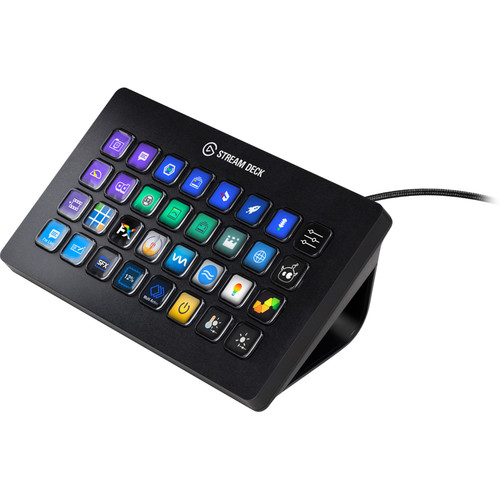
Stream Deck XL sets the benchmark even higher with its expanded 8×4 grid and 32 customizable LCD keys. It offers one-touch tactile control and instant visual feedback for a seamless streaming experience. With direct integrations with popular platforms like OBS, Twitch, and YouTube, and the ability to create custom actions and icons, Stream Deck XL is the ultimate streaming centerpiece.
But its capabilities go beyond just streaming – Stream Deck XL can also be used for video editing, graphic design, and audio production with its hotkey actions and customizable profiles. And with new integrations constantly being added through the Stream Deck SDK, its a device that never stops evolving and improving. So whether youre a content creator or a live production professional, Stream Deck XL is the perfect tool to have at your fingertips.
Included in box
1x Stream Deck XL
1x USB-C to USB-A Cable
1x Magnetic Stand
1x Quick Stand Guide
About the Elgato Stream Deck XL
Sets the Benchmark Even Higher
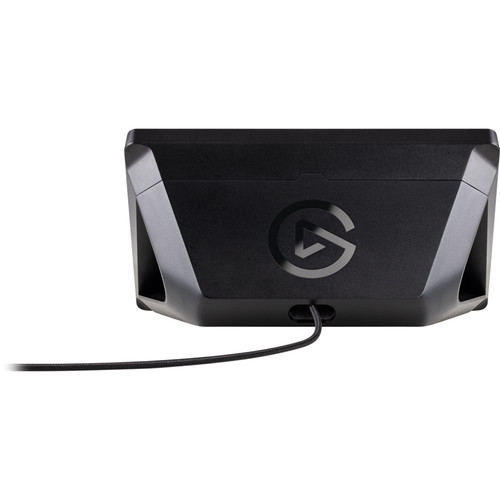
An expanded 8×4 grid provides a grand total of 32 LCD keys, each sporting crisp resolution and fluid playback. Easily customize them all with static or dynamic icons. Enjoy one-touch tactile control like never before. Get instant visual feedback to confirm your every command. And tap with confidence thanks to a non-slip magnetic stand that holds solid at the perfect angle.
Your Streaming Centerpiece
Start streaming. Adjust audio levels and mute your mic. Tweak lighting. Switch cameras. Apply lower thirds. Change scenes. Activate your intermission screen. Trigger onscreen videos, images, GIFs and soundbites. And wrap up with your signature outro. When it comes to advanced live production, Stream Deck XL gives you supreme creative control.
Seamlessly Integrated
Elgato Game Capture, OBS, Streamlabs, Twitch, YouTube, Twitter, and more. Stream Deck XL integrates your tools and automatically detects your scenes, media, and audio sources. So you can directly orchestrate your stream on the fly. And engage your social networks at the perfect moment.
Works with Your Entire System
Hotkey actions make keyboard shortcuts so last century. Now, you launch apps and websites, open folders, access pre-composed texts – even streamline your video editing, graphic design, or audio production workflow – without second guessing. Because you know exactly where your macros are, and they’ve never looked better.
Completely Customisable
Personalizing Stream Deck XL is a breeze. Simply drag and drop actions onto keys, and assign ready-made icons or use your own. 32 not enough? Turn keys into folders to amass as many actions as you want
Easily create your own icons with Key Creator.
Knows What You Need
One moment you’re live and the next, editing a clip, recording a promo, and marketing your channel. Create unlimited Smart Profiles with different key layouts for different tasks, and switch them up as you power through your workflow. Or set Stream Deck XL to automatically switch key layouts for you.
Trigger Chain Reactions
Why tap multiple keys – to start your intro scene, tweet that you’re live, and post a welcome message to your chat – when one will do it all? That’s right. Assign unlimited actions to a single key and launch them all with a tap. One by one separated by intervals. Or together, simultaneously.
Never Stops Evolving
Spotify, Philips Hue, NVIDIA Share, VoiceMod – thanks to Stream Deck SDK, new integrations just keep coming. Stream Deck just keeps getting better. And with everyone in on the action, anything is possible.
Keys 32 customisable LCD keys
Dimensions 182 x 112 x 32 mm (7.17 x 4.41 x 1.34 in) without stand
Interface USB 3.0
Weight 410g
OS Windows 10 (64-bit) / macOS 10.14 or newer
Instantly control your favorite tools and platforms with a tap.
Easily customize 32 keys to trigger unlimited actions.
Take advantage of direct integrations with OBS, Streamlabs, Twitch, YouTube, Twitter, Spotify, Philips Hue, Vmix, VoiceMod, and more.
Tap to change scenes, launch media, switch cameras, adjust audio, tweak lighting, post tweets – anything.
Get immediate visual feedback to confirm your every command.
Use the all-powerful Stream Deck app to drag and drop actions onto keys, and personalize them with custom icons.
Enjoy optimum access and versatility thanks to a non-slip magnetic stand and detachable USB-C to USB-A cable.
Download new integrations and develop your own thanks to Stream Deck SDK.