

Overview
Get everything you need for the most creative production possible! ATEM live production switchers raise the production standard of any live event with their amazing built-in features. These switchers offer upstream luma, linear, pattern, and chroma keying for special effects, as well as downstream keying for logos and lower thirds. Additionally, up to 4 built-in media players with media storage are available for professional broadcast graphics. With ATEM Constellation, users also have access to 4 DVEs for picture-in-picture effects and exciting stinger transitions.
Choose from a wide range of built-in transitions, including Cut, Mix, Dip, DVE, Graphic, and Stinger. Each transition is instantly available and can be fully controlled for type, pattern, length, and more. With so many creative options, there is no limit to the combination of exciting effects that can be created. Popular transitions like Cut, Mix, and Dip are easily accessible and can be performed by directly selecting sources or pressing the cut button for a smooth transition. ATEM live production switchers also offer 18 built-in wipe patterns, up to 4 DVEs, and the ability to create graphic wipes and stinger transitions for added production value. With ATEM Advanced Keyer, users can layer live video, titles, graphics, and animation over live video or graphic backgrounds with high-quality chroma, luma, linear, and pattern keying.
Included in box
ATEM 1 M/E Constellation 4K
Welcome wallet with QR code for software download
About the Blackmagic ATEM 1 M/E Constellation 4K
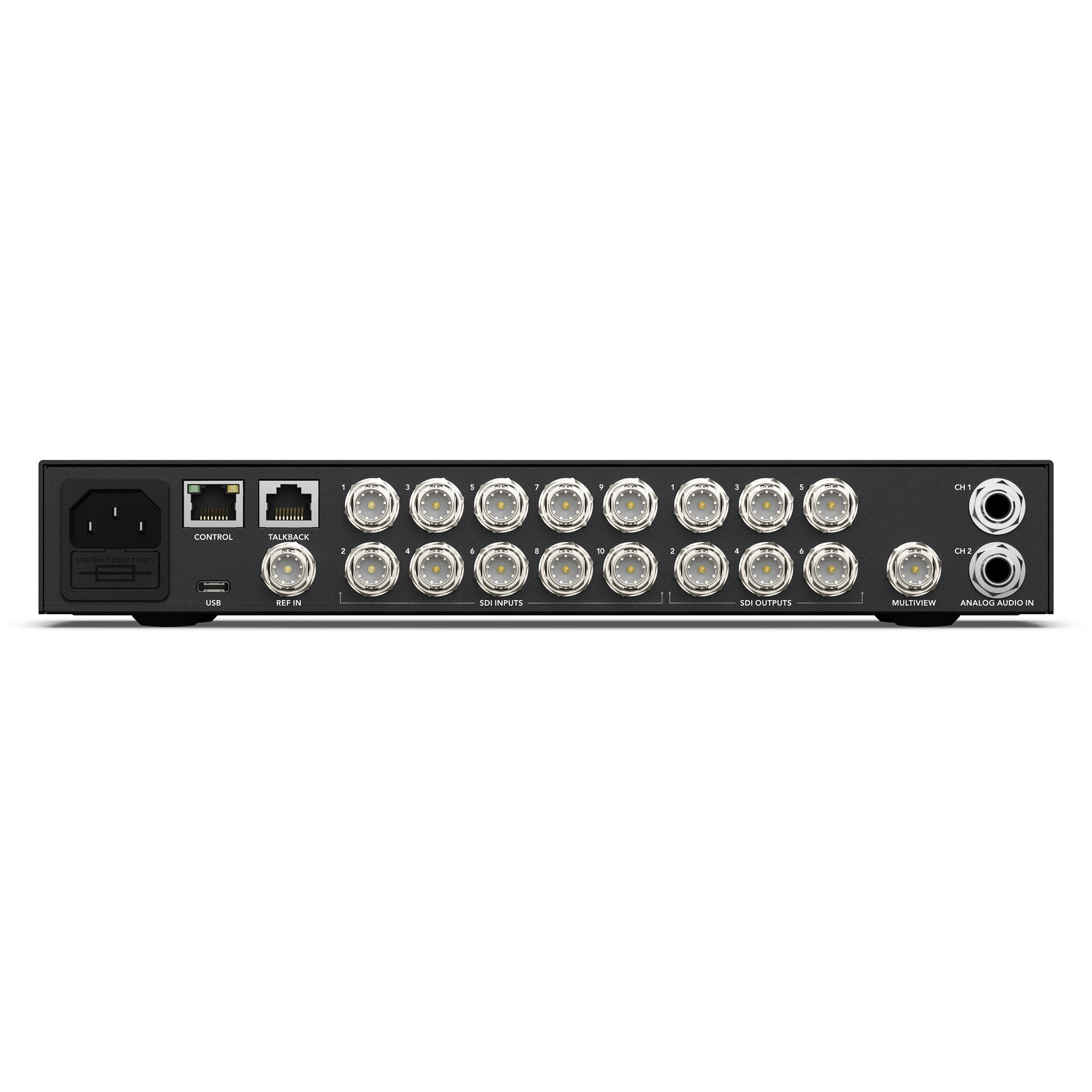
ATEM 1 M/E Constellation 4K is a powerful 1 M/E Ultra HD live production switcher. It features 10 standards converted 12G-SDI inputs, 6 12G-SDI aux outputs, DVE, 4 ATEM Advanced Keyers, a 16 way multiview, media players and USB webcam output. You even get built in talkback and a professional 28 channel Fairlight audio mixer with EQ and dynamics!
ATEM Constellation
Seriously Advanced Broadcast Power
ATEM Constellation switchers feature a compact rack mount design with a built in control panel. This allows operation of the switcher, critical during setup or for emergency use. Also included is a large LCD so you can see program output and change switcher settings via on screen menus. The compact design is perfect for portable live production, with the rear of the switcher including connections for 3G-SDI or 12G-SDI inputs, aux outputs, balanced audio and Ethernet for control. The top 4 M/E models even include RS-422 for serial control and MADI digital audio connections. Even with all this power, ATEM Constellation is extremely quiet with its innovative high efficiency thermal system.
ATEM 1 M/E Constellation 4K
Powerful 1 M/E live production switcher includes 10 standards converted 12G-SDI inputs, 6 x 12G-SDI outputs, DVE, 4 chroma keyers, a 16 way multiview, media players, talkback and USB webcam output.
Designed for Massive Live Events!
ATEM Constellation switchers are ideal for concerts and music festivals because you can place cameras on all areas of the stage for amazing coverage! Even live sports benefit from the huge number of inputs and DVEs let you build multi-layer compositions to cover the action. The fastest way to produce programming is live! With powerful internal graphics and lots of ATEM advanced chroma keyers, you get everything you need for complex program production. ATEM Constellation is also perfect for house of worship programming as it’s big enough to allow professional results, but it’s very simple to learn so it’s easy to train a volunteer crew!
True Broadcast Style Mix Effects Switching
ATEM Constellation uses a professional “program/preview” style operation, which is the exact same way large broadcasters use live production switchers. This means you are using the same type of switcher used by the television industry. Both the free ATEM Software Control and the optional hardware ATEM Advanced Panels will allow program/preview style switching. This means you can select a source on the preview bus to ensure it’s correct before pushing the CUT or AUTO button to switch it on air. This 2 step program/preview process means far fewer mistakes! Program/preview operation means ATEM Constellation is the best solution for training students for a career in broadcast television!
Full Front Panel Control
With a control panel built into the front panel, you can simply walk up and operate the ATEM Constellation at any time. ATEM Constellation has similar features to ATEM Mini, so it’s a fantastic upgrade when you need a bigger switcher! Plus the front panel control buttons are the same premium type used on full sized panels so they are extremely reliable. You can even control keyers, media and fade to black from the front panel! There is an industry standard 5 pin talkback headset connector on the front panel, with controls for talkback control. Plus the front panel LCD and menu buttons also allow almost every single operational feature of the switcher to be accessed!
Up to 40 Standards Converted SDI Inputs!
The ATEM Constellation family features HD models that have up to 40 independent 3G-SDI inputs as well as 4K models with 12G-SDI inputs, with each input featuring its own dedicated up and cross converter. That means it’s possible to convert any 1080p input source to the video standard of the switcher! That means you could have each switcher SDI input running a different television standard and all the inputs will just work! On the ATEM 4 M/E Constellation models, you can even loop out audio channels 1, 2, 3 and 4 from SDI inputs 1 to 30 to the two MADI digital audio outputs, so you can hand off the switcher input audio to an external audio engineer for mixing.
Up to 24 Customizable SDI Outputs
The ATEM Constellation family has a massive number of fully independent outputs. Even the small 1 M/E models have 6 outputs! The 2 M/E models have 12 outputs and the 4 M/E models have a massive 24 outputs. These SDI outputs are very powerful because you can independently route any SDI input or any internal source to each SDI output. That’s perfect for running independent feeds to stage screens, master recorders and streaming processors. Or use the SDI outputs for ISO recorders, where each deck will get a resynchronized switcher input with matching timecode. All SDI outputs contain program audio, RP-188 timecode, SDI camera control, tally and talkback.
USB Webcam Output for Video Software
For live streaming, the USB-C connection on ATEM Constellation operates as a webcam source. That means you can plug into a computer and get working with any video software! The software is tricked into thinking the ATEM Constellation is a common webcam, but it’s really a live production switcher! That guarantees full compatibility with any video software in full resolution 1080HD quality. Choose any software you like, such as Zoom, Microsoft Teams or Skype for a new way to do presentations with a professional multi camera broadcast quality style! The ATEM Constellation webcam output also works with streaming software such as Open Broadcaster, XSplit Broadcaster and more!
Choose from Hardware or Software Control Panels
All ATEM switchers feature a wide range of hardware and software control options, plus it’s possible to share control panels between all ATEM models for different events. Included with ATEM Constellation is a free software based control panel for Mac and Windows. The software connects to the switcher via Ethernet or USB and you can control the switcher, upload media, mix audio and control cameras. Then, when you need more power, you can add an ATEM Advanced Panel for professional switching or an ATEM Camera Control Panel for controlling cameras. There’s even an ATEM developer SDK so you can build your own custom automation control solution!
Includes Multiview with Labels, Tally and Meters
The built in multiview lets you monitor multiple sources on a single monitor. The 1 M/E models include 1 multiview, the 2 M/E models have 2 independent multiviews and the 4 M/E models have 4 independent multiviews! All external SDI inputs, plus all internal video sources can be routed to any view. All multiviews are fully customizable and can be independently set to 4, 7, 10, 13 or 16 simultaneous views. That’s up to 32 views in total on the 2 M/E models and a massive 64 views across 4 monitors with the 4 M/E models! You can add the tally border plus source label and VU meters as an overlay on each view. Plus a red and green border will show tally on each view, so you know what sources are on air.
ATEM 4 M/E Constellation HD features 4 HD multiview outputs so you can see up to 64 different views from cameras, program and preview outputs, and more spread across 4 screens!
Broadcast Transitions, DVE, Stingers and More!
ATEM Constellation includes a wide range of broadcast quality native transitions such as mix, dip, wipe, and more. All transitions can be customized in the system control menus with adjustments for border color, border width, position, direction and a lot more! The ATEM Constellation switcher includes a powerful digital video effects processor for DVE transitions, which can be used to squeeze the current picture off screen revealing a new video under it. The DVE can even be used to create graphic wipe transitions. To eliminate errors, ATEM Constellation features a preview transition feature so you can setup your transitions before you switch it on air!
Built in DVE for Video Effects
ATEM Constellation features up to 4 independent DVEs, depending on the model, that let you reposition graphics and create picture in picture compositions. You get amazing quality and the DVE supports position, resize and scale, all in real time. The DVE lets you create professional picture in picture effects with customizable 3D borders, shadows and lighting. DVEs can also be used to create amazing DVE transitions with squeeze and swoosh effects for adding excitement to your programming. You can even combine DVE transitions with custom graphics to create your own graphic wipe transitions! Then the 2 and 4 M/E models include SuperSource processors for even more DVEs!
Professional Broadcast Talkback
To keep crews working as a single creative team, ATEM Constellation features built in talkback. Talkback supports a 5 pin XLR headset connector, plus a rear mounted RJ12 connector for interfacing with industry standard talkback systems such as ClearCom or RTS. You get full talkback control including program and engineering loops, sidetone control for hearing the headset mic into the headphones and program mix. ATEM Constellation also supports SDI talkback that uses SDI channels 15 and 16 for 2-way communication with Blackmagic Design cameras. You can even use channels 13 and 14 for engineering talkback. It’s even possible to mix the talkback mic into the program audio for voiceovers!
Internal Media for Stills and Motion Graphics
The built in media pool stores broadcast quality RGBA graphics and animations that can be played back instantly by the 2 or 4 media players. Media players simply appear as additional input sources on the ATEM Constellation, so you don’t have to use extra SDI inputs for graphics. The built in media pool holds graphics for use with the media players and the 1 M/E models can hold 20 stills and 200 frame animations, the 2 M/E models can hold 40 stills and 400 frame animations and the 4 M/E models can hold 60 stills and up to 400 frame animations. You can easily manage all of your media using the included ATEM Software Control or download directly from Photoshop using the ATEM Photoshop plug-in.
Includes New ATEM Advanced Chroma Key!
For news or virtual set work, ATEM Constellation is perfect as it features lots of ATEM advanced keyers for high quality chroma or luminance keying! The chroma keyer is incredibly powerful and features a color picker to sample background colors for automatic generation of the key parameters. You get precise controls for edge and flare, and there is even a foreground color corrector so you can match the “look” of the foreground layer to the background layer making seamless compositions possible. The keyer can also be used for pattern and DVE keying! You get 4 ATEM Advanced Keyers on the 1 M/E models, 8 ATEM Advanced Keyers on the 2 M/E models and 16 ATEM Advanced Keyers on the 4 M/E models.
Create Amazing Virtual Sets
With 4 upstream chroma keyers per M/E row, you get the perfect solution for building virtual sets! With so many ATEM advanced chroma keyers, you can use a keyer per camera to create a seamless composition of the camera over the custom background. Even the 1 M/E models have enough keyers to generate a 4 camera virtual set! You can use external image processors for virtual sets, or you can even build a fixed camera virtual set by loading pre rendered still image backgrounds from the media players and media pool. You can setup macros to change cameras and load the correct background into the media players! With so much flexibility, you can experiment to try out different studio setups!
Powerful SuperSource Processing!
In addition to the DVEs in the M/E rows, the 2 M/E and 4 M/E models include powerful SuperSource multi layer processors with 4 extra DVE layers plus a background layer, that all appear to ATEM Constellation as an additional input source. Any switcher video input can be used for each SuperSource DVE, then it’s all layered together over a media pool custom background. SuperSource is just like having an extra multi-layer VFX switcher built in! SuperSource is perfect for doing picture in picture displays for interviews because you can set up the effect while keeping the main DVEs free for other tasks. The ATEM 4 M/E Constellation models even have 2 completely independent SuperSource processors!
Multi Rate SDI for HD and Ultra HD Video Standards
With up to 40 multi rate SDI input connections, depending on the model, the ATEM Constellation is compatible with all types of video sources. You can connect equipment in HD or Ultra HD television standards including 720p, 1080i,1080p and 2160p formats. Only multi rate SDI allows switching between formats so you can instantly adapt to the needs of the job you are doing anywhere in the world! The SDI inputs will also handle embedded audio and mix audio from all video inputs. The program outputs include talkback, tally and camera control information. So you can connect any of the switcher SDI outputs back to the camera for program return, camera control, and talkback.
The First Switcher with Truly Professional Audio
ATEM Constellation is the world’s first live production switcher that fully embraces live professional audio production! All SDI inputs are connected to a built in Fairlight audio mixer that features 6 band parametric EQ, compressor, limiter, noise gate and expander on each input. On the ATEM 4 M/E Constellation models there are 2 MADI outputs for breaking out channels 1, 2, 3 and 4 of the first 30 SDI inputs out to an external audio engineer, plus a MADI input for allowing an extra 32 external audio channels in to the audio mixer. The Fairlight audio mixer even has additional inputs for mixing audio from analog inputs, talkback microphones for voice over and more!
Professional Fairlight Audio Mixer
With a built in Fairlight audio mixer, the ATEM Constellation makes it possible to do extremely complex live sound mixing. The internal mixer has up to 156 input channels, for the biggest audio mixer in a live production switcher! Audio is de-embedded from all the SDI video inputs and passed to the audio mixer. Then the 4 M/E models have extra audio mixer input channels for the MADI audio inputs. Each input channel features the highest quality 6 band parametric EQ and compressor, limiter, expander and noise gate as well as full panning. All this audio power can be controlled via the ATEM Software Control or a Mackie compatible panel.
Includes Free Software Control Panel
The ATEM Software Control Panel gives you total control over your switcher and is included free. The ATEM Software Control Panel features a beautifully designed interface with a visual switcher and parameter palettes for making quick adjustments. Multiple users can connect to the switcher via Ethernet and all work on different parts of the event at the same time! The ATEM Software Control also lets you access camera control, audio mixing, media, macro programming and even control of HyperDeck disk recorders. You can even save the full state of the switcher as XML files, plus all media is backed up from the media pool. Plus you can run the software on Mac or Windows!
Add the Speed and Power of an ATEM Hardware Panel
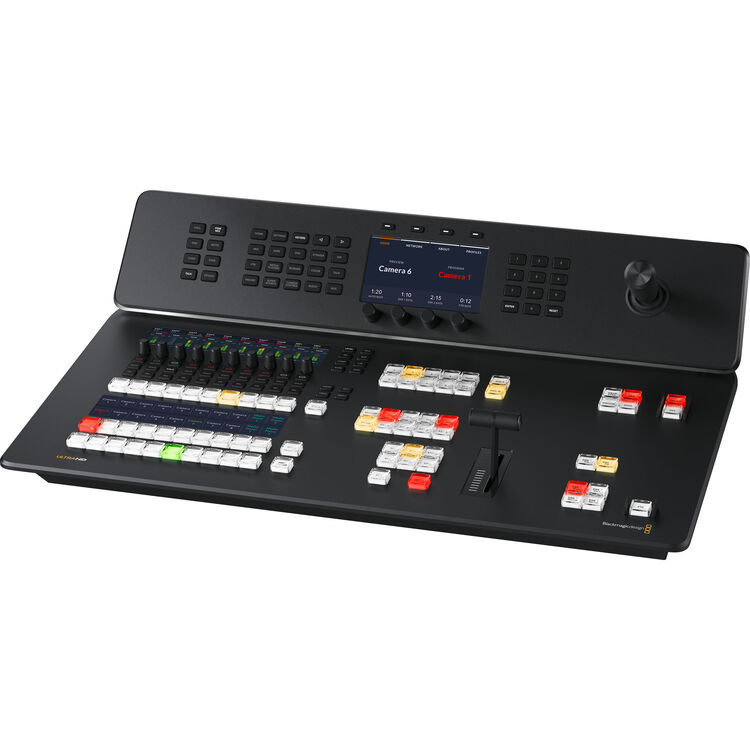
Only ATEM Constellation has such a wide range of control panel options with 7 models of ATEM Advanced Panels available. ATEM Advanced Panels feature an industry standard, familiar M/E style layout. Each panel has built-in LCDs for menus, high quality buttons with customizable illumination color, a DVE joystick plus T-bar fader. You can even setup and trigger Macros! All rows of M/E buttons include integrated LCDs for dynamic input button labeling. The 1 M/E panels feature a single M/E row while the 2 M/E panels have 2 rows. Both 1 M/E and 2 M/E Advanced Panels are available in either 10, 20 or 30 input button models. The massive 4 M/E model features 4 M/E rows with 40 input buttons per row.
Alternative Portable Panel!
The ATEM Micro Panel is a low cost solution for adding panel control to ATEM Software control. Featuring the same high end buttons as ATEM Advanced Panels you get a true broadcast quality feel. It also has a familiar layout with buttons for program and preview. You can use the shift buttons to access up to 20 sources. There are 4 upstream and 2 downstream key buttons, plus a macro button. It even has 4 M/E buttons so you can control a massive 4 M/E switcher! There’s a fader for smooth manual transition control, which also means it’s low profile and very portable. With connection via USB-C or Bluetooth and a large internal battery, ATEM Micro Panel is perfect when you need a portable panel!
Get Industry Standard Professional Camera Control
The new ATEM Camera Control Panel provides 4 industry standard camera controllers for the same workflow as camera chains costing hundreds of thousands of dollars! Designed to be portable, ATEM Camera Control Panel can be placed on a desktop or on a slide out rack shelf. All control commands are sent to the cameras using the SDI camera control protocol which is supported by cameras such as Blackmagic URSA Broadcast and Blackmagic Studio Cameras. You get dedicated controls including CCU style joystick and controls for RGB camera color, master gain, black, iris and more. Plus all controls are arranged in a familiar broadcast layout perfect for both experienced or new operators!
Compatible with Blackmagic Cameras, Panels, Decks and More!
ATEM switchers are powerful because they can grow and expand with you. Add an ATEM Advanced Panel to get professional industry standard switcher control. Then add an ATEM Camera Control Panel for fast control and color balancing of up to four cameras. For cameras, Blackmagic Studio Cameras make great studio cameras as they have tally, talkback and control all built into the compact and very portable design. For mastering, Blackmagic HyperDeck Studio recorders are perfect because they include popular file formats such as ProRes, H.264 and DNx. You can even live stream using an UltraStudio or Blackmagic Web Presenter! Then add a Micro Converter SDI to HDMI 3G converter for HDMI monitoring!
Blackmagic URSA Broadcast G2
Designed for broadcast and live production, you get a 6K sensor with +36dB of gain, wide dynamic range and B4 lens mount. Includes Blackmagic RAW, ProRes, H.264 and H.265 record file formats.
Blackmagic Studio Viewfinder G2
Turn URSA Broadcast into a professional studio camera with large and bright 7 inch screen, removable sunshade, adjustable mount and knobs for control of brightness, contrast and focus peaking.
Blackmagic Camera Fiber Converter
Connect URSA Broadcast cameras to live production switchers using SMPTE fiber with all video, control connections and camera power on a single SMPTE fiber cable up to 2 km away!
Blackmagic Studio Fiber Converter
Convert SMPTE fiber to 12G-SDI broadcast equipment while powering remote cameras up to 2 km away. Supports converting SMPTE fiber to 12G-SDI, multiple channels of return video, control and power.
Blackmagic Studio Camera 4K Pro G2Designed for professional SDI switchers, you get the features of the Studio Camera Plus, as well as 12G‑SDI, XLR audio, bright HDR LCD, 5-pin XLR talkback, 10G Ethernet IP link and HD live streaming.
HyperDeck Studio HD Mini
Miniaturized deck records H.264, ProRes or DNxHD files onto SD/UHS-II cards or external USB disks in SD/HD formats to 1080p60. Includes timecode and reference generators, 3G-SDI in/out and HDMI out.
HyperDeck Studio HD Pro
Includes all the features of the Plus model, and adds 2 SSD slots as well as the 2 SD card slots. Also includes machined metal search dial with clutch, SDI monitor out and XLR timecode connections.
ATEM Camera Control Panel
Control up to 4 cameras at one time including iris, shutter speed, white balance, master gain, pedestal, RGB and more!
All Features Included. No Hidden Costs!
Unlike other switchers, all features are included in the purchase price. That means you get all features fully enabled and always ready for use! There are no license fees to allow you to use features and no ongoing monthly costs. This means you’ll never experience a license expiring 5 minutes before your program starts! Advanced features such as multiview, SuperSource, DVEs or the ATEM Advanced Keyers are always enabled and always ready to use! Plus, you can use the free ATEM Software Control on an unlimited number of computers. That’s important when you divide up the workload with separate people for audio mix, graphics prep, camera control and switcher operation!
Design
Massive Next Generation Switcher
ATEM Constellations have been designed as next generation switchers with new technologies and a large number of features for handling the latest and most complex work. The massive 4 M/E models even include 40 inputs, 24 outputs, plus lots of DVEs, advanced keyers and multiviews, all in a design that’s still fast and easy to use. A great example is the front control panel, which has been specifically designed to operate in a similar way to an ATEM Television Studio switcher. This ensures ATEM Constellation is an easy upgrade as it will feel very familiar.
Full Front Panel Switcher Control!
On the front panel, the keypad allows selecting up to any of the 10, 20 or 40 inputs, plus these buttons are the same type as used on the professional control panels. Switching from the front panel is easy as you just select a source, then select cut or auto. There’s even an alternative cut-bus mode for instant switching when pressing a button. Plus there are buttons for enabling key and media players. The full switcher features are available via the LCD where you can scroll the menus and operate the entire switcher! Of course the natural way to operate the switcher is using an external panel or the free software, but the front panel is great for emergencies, during setup and for smaller AV style jobs.
Includes Built‑In Talkback!
The advanced design also includes professional talkback and because the switcher communicates via the SDI camera feed combined with the SDI program return feed, you don’t need to run extra cables just for talkback. Program talkback is sent to and from the camera on the unused SDI audio channels 15 and 16, or channels 13 and 14 for separate engineering talkback com loops. The front panel has an industry standard 5 pin broadcast headset connector plus buttons to enable talkback communication. Then for large broadcast jobs, the rear panel includes an RJ12 expansion connector so you can connect to industry standard talkback systems such as ClearCom or RTS.
Super Bright LCD for Monitoring and Setup!
On the right side of the front panel there is an LCD screen and menu buttons as well as a scroll knob for setting menus. The LCD also shows the current program output, audio level meters and the input label at the top of the screen is the current selected audio channel, which will indicate what audio source will be adjusted when turning the knob. The audio meters are true VU meters and feature the correct ballistics and colors so they conform to the VU audio meter specification. You can use the menus to operate the switcher, but these menus are also where you can change the switcher settings, such as television standard, multiview settings and network IP address.
Massive 156 Channel Fairlight Audio Mixer!
One of the unique features of the ATEM Constellation 4 M/E models is their very large Fairlight audio mixer. This big mixer has been included because its the switcher operator who gets all the video sources and along with that, the audio sources too. A big internal mixer makes it easy to work with all the switcher audio sources directly. The Fairlight audio mixer has all 40 inputs, plus the 2 ch analog inputs, the audio from the media players, audio from the talkback mix and 32 stereo channels from the MADI input. That’s a big mixer with full access to all audio! Each input even has 6 band parametric EQ, compressor, limiter, noise gate and more.
Remote Control for Custom Solutions
The rear panel ethernet connection supports the ATEM switcher protocol for fast low latency switching. All the ATEM control panels and the free ATEM Software Control use this protocol and you can plug in the panels direct to the switcher so you don’t need a network switch. However because it’s ethernet, you can plug into your network and control the ATEM remotely, even from overseas! Ethernet allows you to add as many panels as you like all at the same time, or custom solutions using the developer SDK. Many broadcast automation systems use serial control because it’s simple and fast. ATEM Constellation includes an RS-422 connection and the protocol is documented in the instruction manual.
Innovative and Quiet Thermal System
ATEM 4 M/E Constellation features an innovative cooling system that keeps the design small at only 2 rack units, so it can also remain portable. The 3 fans allow enough extra cooling capacity that they can reduce speed and run slow. This reduces fan noise and reduces fatigue. The internal heatsinks have also been custom designed so air flow is directed over components and airflow turbulence is reduced to further assist in keeping the noise down making it very quiet for such a larger switcher. All the air ducts and heat sinks have been custom designed specifically for the 4 M/E models so the cooling system can be perfectly matched to this large switcher design.
Redundant International Power Supplies
The ATEM 4 M/E Constellation models feature 2 power supplies and each power supply can operate the switcher by itself so 2 power supplies mean you get 100% redundancy. Each power supply even has a separate independent AC connector on the rear panel, so this means it’s possible to power the switcher from 2 different AC sources. If an AC source goes down, you still won’t get a power interruption. This is extremely useful where one AC connection can be a different power phase, a generator or a UPS. The power supplies will automatically adapt to various voltages from 100V to 240V so the switcher can travel the world with you and continue to operate perfectly.
Software Control
The world’s most advanced live production switcher control software!
ATEM Constellation can be operated from the front panel, or you can control it using the included free ATEM Software Control for Mac or Windows. ATEM Software Control gives you even more control and creative options! You can switch video sources live, load the media pool with graphics, use transitions and keys, change switcher settings and mix audio. For larger live productions, you can even run multiple copies of the software so that more than one person can work on the show at the same time!
Elegant and Intuitive Interface
ATEM Software Control features an interface that’s been specifically designed for speed and accuracy. It features separate pages that make it easy to find the controls you need for each of the switcher’s major functions such as control, audio, macros, media and deck control. The switcher page features a familiar layout with buttons for sources, transitions, keyers and more. In addition the switcher page also has palettes that let you adjust transitions, keys and the media player. The media page lets you manage all of your graphic files and upload them to the switcher, while the audio page lets you control the built in multi channel Fairlight audio mixer.
Switcher
Adjust switcher settings, make live cuts, adjust keys, apply transitions, overlay graphics and more.
Switcher interface
Upload RGBA still image and motion media files. Graphics can be used for titles, bugs, lower thirds and more!
Audio
Professional Fairlight audio mixer with faders, 6 band EQ, compressor, limiter and much more!
Camera
Fully control and color correct cameras via the SDI return feed to supported Blackmagic Design cameras.
Switcher Control – Full virtual switcher control panel!
You get the most efficient live production workflow with ATEM! The program bus is always live and allows direct source switching, so when you select a source it will immediately go on air. You can also take advantage of the advanced preview bus, which lets you make selections and preview them on a monitor before putting them on air. You can see what you have ready to go on air, and take it live with a press of the cut or auto buttons! Using the preview bus helps you see the next transition source so you can confidently control your live production.
Transition Control
The transition control block gives you fast access to quickly select transition styles and set timing on the fly during live production. Choose from mix, dip, wipe or even DVE transitions, then use the auto button to trigger transitions immediately when you switch sources, or use the fader bar for full manual control!
Transition Settings
ATEM Software Control lets you quickly access all transition settings and make precise adjustments before putting them on air! The transition palette has a wide range of adjustments. Simply choose the transition type and adjust its parameters. With so many options, you’ll be able to create the perfect transition for your production!
Upstream Keyer
When you need fast and seamless keying, the software controls allow precise adjustments. Green and blue screen backgrounds are never perfectly flat, so it’s vital to have powerful key controls that let you handle any kind of key! You get precise control of key parameter such as color, spill/flare suppression, foreground color correction and more.
Downstream Keyer
ATEM Constellation includes up to 4 downstream keyers for adding a bug, logo or lower third to your program’s output stream. Simply load PNG, TGA, BMP, GIF, JPEG or TIFF images with an alpha channel into the media pool and send to the media player for keying! Because it’s downstream, it’s perfect for graphics, titles and short animations or clips.
Auto Transition
You can customize the duration of transitions, then use the auto button for smooth and perfectly timed transitions. When the auto button is turned on, switching between sources will automatically add the transition. Use auto for mix, dip, wipe, DVE and more! Auto changes to trigger transitions when set to program/preview switching.
DVE Settings
The ATEM Constellation DVEs can be used for more than picture in picture effects because it can be used for DVE transitions. The transition palette in the ATEM Software Control app gives you precise control over all DVE options. Choose from over 18 dramatic DVE moves to add excitement to your production. DVE transitions can also be reversed!
Preview Transition
Preview transition allows complicated multi layer green screen keys to be rehearsed before using them on air! Preview video can be seen on an aux output or multiview. Using preview transition is the best way to ensure your transition is perfect before going on air!
Fade To Black
When your program is starting, ending or has a commercial break the fade to black (FTB) button will fade all layers up or down at exactly the same rate. Fade to black is the last layer of the switcher so you can be sure every video and graphic layer, and every source, is faded cleanly together and in perfect sync! It will even fade the audio!
Camera Control
ATEM Constellation can provide full control of your cameras right from the ATEM Software Control app! Simply connect a Blackmagic Studio Camera, URSA Mini or URSA Broadcast camera to your ATEM Constellation to get full camera control! All control communication to the camera is sent via the SDI aux outputs of the switcher, to the PGM input of the cameras. Control the tally light, white balance, ISO and shutter as well as the iris, focus and zoom on supported lenses. There’s a DaVinci primary color corrector built into the camera, so you can go well beyond simple color balance. Camera control allows traditional CCU or DaVinci color correction. Then add an ATEM Camera Control Panel.
Media Page
Drag and drop media to use it with your switcher!
Media Player
ATEM Constellation features up to 4 media players that can be used to playback stills and animations stored in the media pool. You can use PNG, TGA, BMP, GIF, JPEG and TIFF files as well as video files for motion playback with alpha channel and audio track. Files with alpha channels can be used as bugs, lower thirds, titles and even stingers!
Media Pool
ATEM Software Control lets you drag and drop RGBA still graphic files and full motion video files to ATEM Constellation. You can then browse and select what clips or stills are presented to the switcher as a video source via the media player. You can use the included Photoshop plug‑in to transfer graphics directly to the switcher.
Audio Page – Professional multi channel audio mixer!
ATEM Control Software includes a built in multi channel Fairlight audio mixer that lets you independently adjust the level and balance from all of your audio inputs. The internal audio mixer features up to 80 channels of audio from the SDI inputs. ATEM 4 M/E Constellation models have 64 audio channels from the MADI input. Each input has independent 6 band parametric EQ, compressor, limiter, expander and noise gate as well as full panning. All inputs are metered so you can always see your source’s levels. There are buttons to turn audio on for each source and for audio to follow video (AFV) There’s also a master fader for adjusting the final mixed program audio that is output to video.
Parametric Equalizer
Good equalization is the secret to good broadcast sound! The internal Fairlight audio mixer features 6-band parametric EQ on every single input channel. You can adjust 6 separate bands of frequencies to boost, fatten or thin the sound. This means mic inputs can be adjusted to be clear and easy to understand while other inputs can remain untouched.
Dynamics Processing
The internal Fairlight audio mixer also features a high quality compressor, limiter, expander and noise gate on every audio input channel. The compressor and limiter stop mic levels from excessive volume and distortion. Noise gate eliminates background noise in mics. Dynamics really make it easy to place different channels in an overall audio mix!
Switcher Settings – Quickly customize switcher settings for your program!
Setting up for new jobs is easy with ATEM Software Control! Switcher settings are logically organized so you can change them quickly. You can set ATEM Constellation to any video standard in 720p HD, 1080p HD or 1080i HD, and up to 2160p Ultra HD on ATEM Constellation 4K models. You can also customize input labels that will be used to track sources when used on external hardware panels or ATEM Software Control. Even the multiview can be customized including program/preview arrangement, audio meters and more! You can even control HyperDecks for remote trigger and use them for motion media playback!
Instantly Recall Setups
ATEM Constellation lets you quickly save your switcher set up at any time which means you can recall it instantly! The switcher state is saved as an XML file so you can even edit the files to make changes. If you’re transitioning to ATEM Constellation from another ATEM switcher, then you can use the XML setups from any other model of ATEM switcher, even an ATEM Mini XML setup file! It all just works! You can save the switcher state any time you like, or you can setup ATEM Software Control to auto save at regular intervals and the older versions of the files are kept. When saving the switcher state, you save not only the settings, but all of the media pool contents as well!
Create Macros
Macros let you automate complex sequences of actions on your switcher that would be difficult to do during a live production if you have to press multiple buttons manually. You can record transitions between sources, key effects, graphics and more. Simply open the macro window, select record and operate your switcher like normal. Your actions are automatically stored in your ATEM Constellation and can also be stored as XML files so you can edit and combine multiple macros together. To use a macro, just press the macro button! Macros are also available on external hardware panels so you can trigger a macro from multiple locations, as well as ATEM Software Control.
HyperDeck Control
ATEM Constellation works with Blackmagic HyperDeck Studio recorders so you can use pre‑recorded clips in live programs! You can connect up to 10 HyperDecks as sources, see a list of clips on each one, select a clip, cue it, pre-roll, and play it back at any time. It’s perfect for adding pre-recorded spots, promos, credit rolls and more to your live program! Imagine setting up a HypeDeck to play advertising spots at events, all automated with HyperDeck control and macros! HyperDecks could even be used to generate fun backgrounds for music videos as well as animated backdrops to key people over, all perfectly in sync!
Multiple Users
Producing large live events such as sports, concerts, worship services, and educational events requires a high performance team of multiple creative people working seamlessly together. ATEM Constellation’s Ethernet connection means multiple control panels can be used all at the same time. You can run multiple copies of ATEM Software Control where different people can switch, manage media, mix audio and control cameras, all on different computers so they don’t interfere with each other while working. Even hardware panels can be added for the best workflow for when you’re working on a big live event. You can even run software remotely over the Internet from any location on the planet!